
LEDと通知制御
またあなたは通知用の振動パターンで繰り返し音を設定することができます。また点灯および/または音や振動が聞いたり見られないところで"スリープ"モードまたは"充電中"を設定することができます。 BlackBerryデバイスから来ると
BeBuzz/ BerryBuzzの機能を欠場した場合、ライトフローを試してみる!
このプログラムでは、500以上のアプリケーションや次のようなシステムイベントの通知の色を制御することができます: *不在着信 *ボイスメール *カレンダーのリマインダ *gmail *メール *SMSメッセージ *MMSメッセージ *低い電池 *信号がない *Googleトーク *フェイスブック *ツイッター ...そして300以上のアプリ
サポートされているアプリケーションの完全なリストについては、当社のウェブサイトを参照してください:http://www.folioflow.com/ff/page/website/lightflow/pageId/1687これは色が連続して点滅することができますので新しいSMSまたは不在着信を持っている時2色を使い分けることができます。 また最も高い優先度を持っている通知の種類を設定してその1色だけという点で、点滅させることができま
す。
携帯電話が充電されている時とバッテリで動作しているときに異なるプロファイルがあります。あなたはそれがあなたの好みのためにバッテリーをあまりにも食べると見つけるならバッテリーの使用を節約するために設定を変更することができま
す。
完全な変更履歴については、こちらを参照してください:https://www.folioflow.com/ff/page/website/lightflow/pageId/1693
既知の問題/制限事項-------------------------すべての携帯電話はすべての色をサポートしていません。たとえば: ほとんどのHTCの携帯電話は3色をサポートし、 "ルート"と "ダイレクトモード"でアプリを実行するこたが必要です。
いくつかの携帯電話は画面がオフになっている間のみ通知を点灯することができます。
いくつかの携帯電話はその通知の光を常にオンに持つことはできません
携帯電話によっては、その通知の点滅を持つことはできませんし、それは常にオンになります
アプリはあなたの通知の制御を引き継ぎますのであなたはアプリが許可するカテゴリの通知のみを取得することに注意してください。
About LEDと通知制御
- Package name (App ID)
- com.rageconsulting.android.lightflow
- Available on
- Google Play
- Price
- $2.49
- Developer
- Reactle
Looking for the LEDと通知制御 APK?
The safest way to get LEDと通知制御 (com.rageconsulting.android.lightflow) on your Android device is to install it directly from Google Play — you'll always get the latest official version, automatic updates, and no risk of modified or infected APK files from third-party sites.

24/7 Support
Our dedicated support team is always ready to help you.
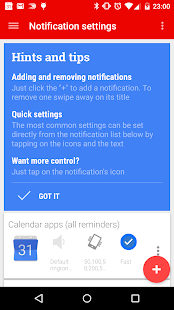
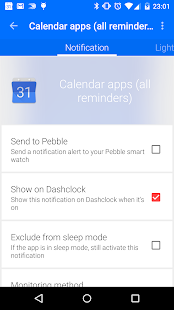
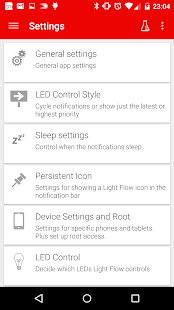
LEDと通知制御 の動作を見る
ユーザーの評価
私たちの言葉だけを信じないでください。このAndroidアプリについてユーザーが何と言っているかをご覧ください。
"Gd"
"Not working on my Sony Xperia 1 with GSI A12 and root 🥰"
"Hate the persistent notification"
"Abandoned app"
"This app is simply amazing. It does what it says with incredible efficiency. I've had a lot of full featured apps and background services just clog my phone all up, but Lightflow runs very smoothly."
"Crashes with the latest update when you swipe active notifications"
"Not fully working with Pixel 6 Pro."
"I installed this on by BLACKBERRY KEY2 (from 2018 and also running ANDRIOD 8.1 in 2022) as soon as I found out the generic ringtones and sounds included w/ the device and software were not individually selectable per application, notification or contact. LIGHTFLOW PRO easilly allowed me to do so and just the little things, as the few elaborated about above makes the smartphone experience much more pleasurable! I would highly recommend LIGHTFLOW PRO!"
"The app claimed it could silence certain notifications and it did not work"
"great app, works great on the sony xperia 10 iii, did had a worry i wasn't going to find any app that would work the previous one i used which was the LED Blinker which didn't work properly, wasn't sure Light Flow was going to work as i tried this on my previous phone sony xperia Z5 android nougat, so i had to replace it with the LED blinker, but strangley it does work! i have always liked this app over LED blinker, im so glad i can use Light Flow again"
Frequently Asked Questions
Is LEDと通知制御 free?
LEDと通知制御 is a paid app — it costs $2.49 on Google Play. You pay once through your Google account and can install it on your Android devices.
How do I install LEDと通知制御 on Android?
Open Google Play on your Android phone or tablet, search for LEDと通知制御 by Reactle or tap the Google Play button on this page, then tap Install. The app downloads and installs automatically.
What is com.rageconsulting.android.lightflow?
com.rageconsulting.android.lightflow is the App ID (package name) of LEDと通知制御 on Google Play. Every Android app has a unique package name, and it is the safest way to verify you are installing the official app.
Is LEDと通知制御 safe to download?
Installing LEDと通知制御 from Google Play is the safest option: you get the official version published by Reactle, verified by Google Play Protect, with automatic updates. Avoid APK files from unofficial third-party sites.

Get LEDと通知制御 Today
LEDと通知制御 for Android — $2.49 on Google Play.
Compatible with Android phones and tablets — available on Google Play.